AMPathWeaver
The scan-path generator for Laser Powder Bed Fusion. PathWeaver turns a part and a process strategy into a complete, time-stamped laser trajectory — the single contract every downstream solver in the AM stack is built on.
What PathWeaver is
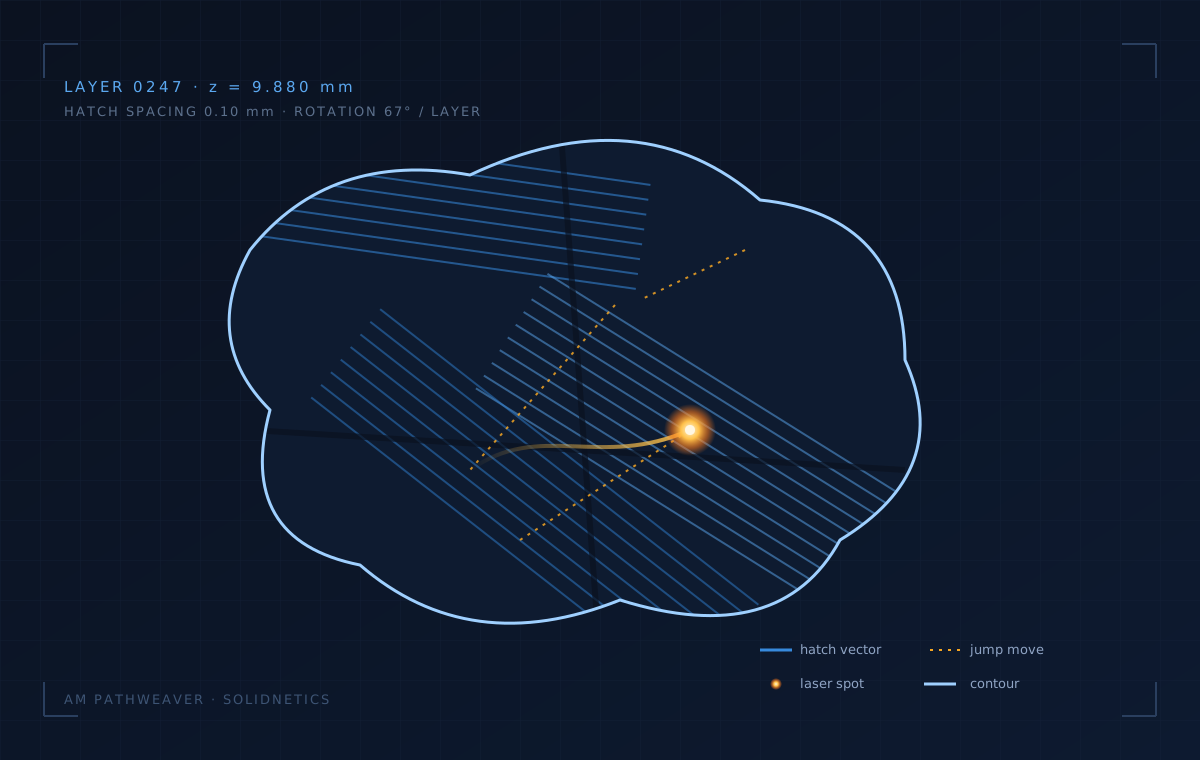
The lightest solver in the stack computationally — and the most critical to get right, because every downstream solver reads its output. PathWeaver holds no physics: no PDEs, no thermal field, no material state. Pure computational geometry and combinatorics.
Reads the part
Ingests an STL or STEP mesh, repairs it, and tags every face as up-skin, down-skin, wall or support before a single layer is sliced.
Weaves the path
Slices into layers, decomposes each into stripe or island regions, and fills them with rotating hatch vectors bounded by contour passes.
Stamps the timeline
Orders every vector and stamps a start/end time from scan and jump speeds, emitting one ordered, time-resolved trajectory file.
Inside the engine
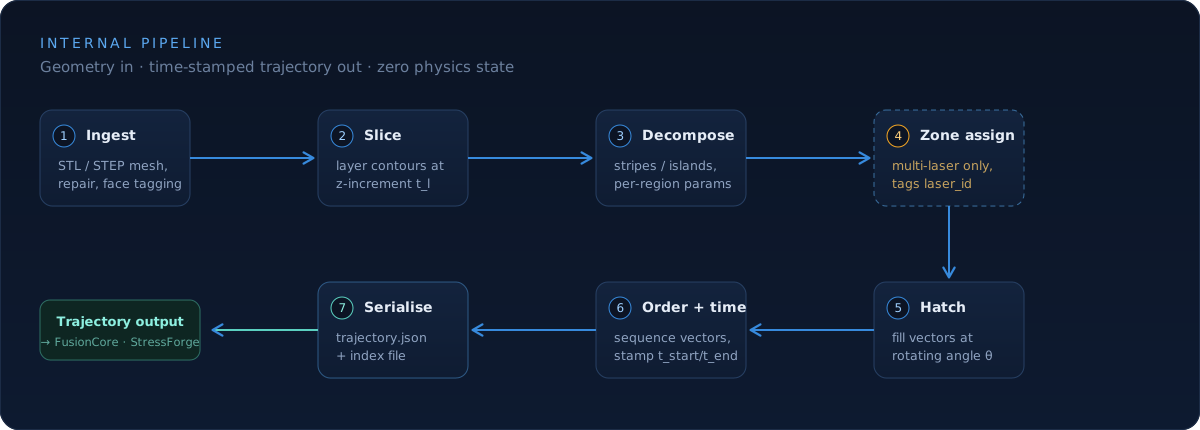
Seven sequential stages take geometry to trajectory. Stage 4 — zone assignment — activates only for multi-laser machines, where each laser owns a build-area zone and the output carries a laser_id per segment.
Capabilities
Six features that define what a trajectory file actually carries downstream.
Configurable scan strategies
Choose how each layer is filled — applied uniformly or per-region:
- Stripe · long parallel hatch bands
- Island · checkerboard tiles to break up thermal accumulation
- Chessboard · alternating rotated patches for stress homogenisation
- Configurable hatch-rotation increment per layer (e.g. 67° golden-angle)
Each region of a layer can carry its own fill strategy, power, and hatch spacing.
Multi-laser machine support
Same solver, single- or multi-laser machines:
- Optional zone-assignment stage partitions the build area per laser
- Every output segment is tagged with a
laser_id - Per-laser parameters (power, jump speed) can vary across the same trajectory
- Concurrent scanning is preserved end-to-end through the pipeline
Build-area zones distributed across all available lasers — concurrent scanning preserved in the output trajectory.
Per-region process parameters
Different physical regions of the part can carry independent process parameters:
- Volume infill — high-throughput hatching
- Contour pass — finer power and spacing for surface finish
- Up-skin / down-skin — tuned for surface quality
- Supports — fast, low-power scanning isolated from the part
h = 0.10 mm
h = 0.05 mm
h = 0.08 mm
h = 0.15 mm
Pre-slice validation
PathWeaver checks the oriented part against the machine envelope before slicing — oversized jobs fail early, not after an hour of compute:
- Build envelope & orientation-aware checks
- STL mesh repair and watertightness verification
- Face-tagging (up-skin / down-skin / wall / support) sanity checks
- Strategy compatibility — e.g. island size vs. minimum feature size
✓ STL watertight ........ 12,488 faces
✓ Build envelope ......... fits 250×250×300
✓ Face tagging ........... 4 surface classes
✓ Strategy compatible .... island ≥ 2.0 mm
⟶ ready to slice (247 layers)
Single trajectory output contract
One trajectory file carries everything downstream solvers need:
- Ordered segment list with
t_start/t_endtimestamps laser_idtag for multi-laser machines- Per-segment power, scan speed, jump moves
- Region metadata (volume / contour / skin / support)
- Compact
trajectory.json+ an index file for random-access reads
{
  "layer": 247,
  "z_mm": 9.880,
  "segments": [
    { "id": 14201, "type": "contour",
      "p0": [10.2, 4.8], "p1": [10.4, 4.9],
      "P_W": 180, "v_mm_s": 950,
      "t_start": 12.4801, "t_end": 12.4824,
      "laser_id": 2 },
    ...
  ]
}
Lightweight computational stack
No FEM mesh, no voxeliser, no PDE solver. PathWeaver runs on a pure geometry stack:
- trimesh — STL/STEP ingest, repair, face tagging
- Shapely — 2D polygon decomposition, hatch generation, contour offsets
- scipy — ordering, nearest-neighbour jump-move optimisation
Runs in seconds for typical parts — even larger builds finish before the lab kettle boils.
The data contract
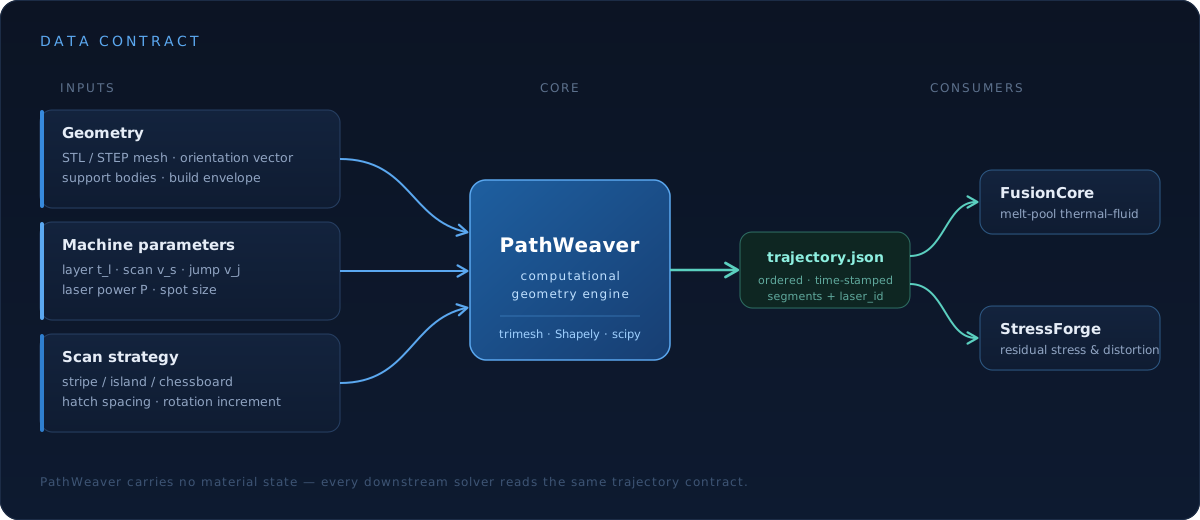
Three input groups go in; one trajectory comes out. Because PathWeaver carries no material state, FusionCore and StressForge each consume the same contract without needing to know anything about the original geometry.
Where it sits
PathWeaver opens the AM pipeline. Its trajectory drives the melt-pool solve, which feeds microstructure and residual-stress prediction, converging in part qualification.
Why cloud
No installation. No licensing servers. No workstation needed. Trajectories generate on SolidNetics cloud infrastructure — your local machine stays free for design work.
Scalable compute
Million-segment trajectories run on high-throughput cloud workers. Concurrent multi-laser jobs slice in parallel.
Stack-native handoff
Trajectory feeds straight into FusionCore and StressForge — no manual file moves, no format conversion.
Always up to date
New scan strategies, machine profiles, and validation checks roll out automatically — no patches.
From geometry to trajectory
Three steps from upload to a machine-ready trajectory file.
Upload & orient
STL or STEP mesh, build orientation, and (optional) support bodies.
Pick strategy & machine
Stripe / island / chessboard, hatch rotation, machine profile, single- or multi-laser.
Export trajectory
Time-stamped trajectory.json — ready for FusionCore, StressForge, or your own machine driver.
Applications
Built for LPBF process engineers, AM machine builders, and research teams developing new scan strategies — from production-grade metal parts to thermal-stress sensitive geometries and qualification builds.
Generate your next scan path in the cloud
PathWeaver is part of the SolidNetics AM module. Talk to us about access for your team, machine fleet, or research group.